


Home>AIPPC Program
At EDGE Project Controls, we understand that the Project Controls industry is evolving rapidly, and the need for skilled professionals has never been greater. To bridge this talent gap, we’ve designed a comprehensive curriculum that goes beyond traditional training. Our goal is to set a new industry benchmark, empowering our students to lead and excel in this dynamic field.
Whether you’re just starting out or looking to advance your career, our programs cater to all skill levels. Through immersive workshops, expert-led sessions, and real-world project simulations, you’ll gain practical, job-ready expertise. More than just learning technical skills, you’ll embrace the Edge Project Controls ethos—driving project success and exceeding client expectations.


For us, the EDGE Way of Learning' is more than a methodology – it's a commitment.
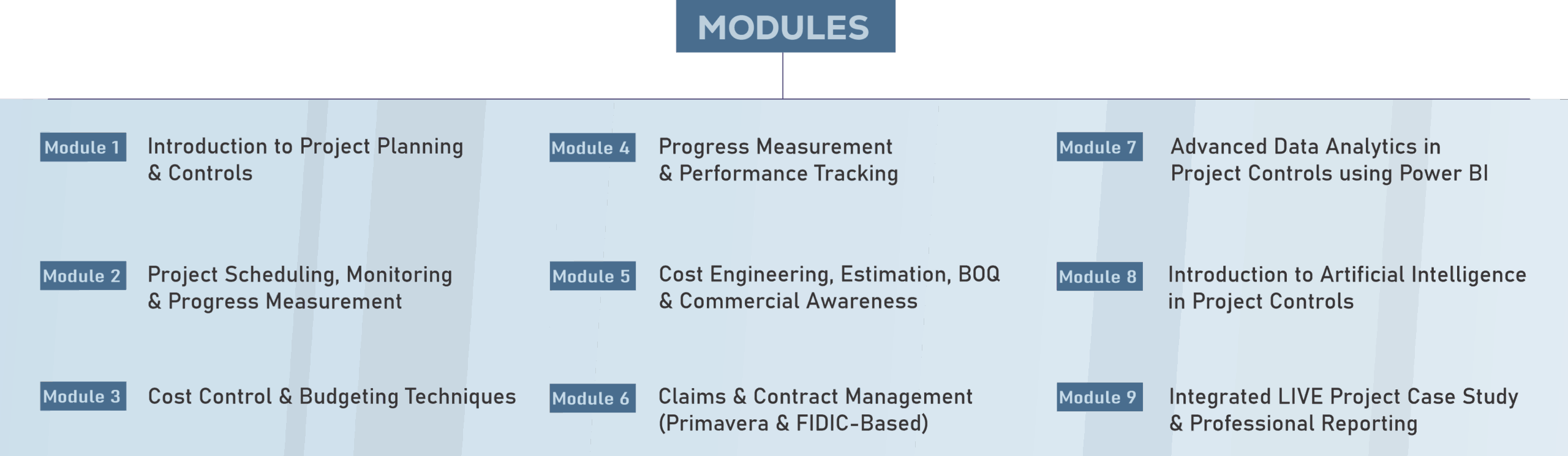
Initially Trainees will be provided training on Accredited EDGE-PC Academy Modules listed from 1-4 & 7. Hands on case study exercises will be complete with each module to ensure trainees understand theory in practice. Trainees will have proficiency in software courses that align with future client needs such as a P6, Power BI & MS Project courses. Through this period Graduates will learn & work on projects with support from the EDGE Project Controls Team.
After 2 months trainees will be ready to work on external projects with support from the EDGE Project Controls Team 3/4 days a week (Modules 6 & 9). They will spend the rest of their time finishing EDGE-PC Academy Modules (1-4 & 7) Assignments and Exercises.
For the last 2 months on the scheme trainees will be provided online training for Costing, Estimation, Cost Control, AI Tools in Project Controls,etc (Modules 5 & 8)
Every educational institution has its foundation, and at the EDGE-PC Academy, ours is built on four pillars. These pillars not only define our ethos but also guide our unique approach to learning, ensuring that every participant emerges as a well-rounded project controls expert.
The Edge Projects Academy immerses students in real-world complexities, emphasising practical relevance and holistic understanding. Here, learning goes beyond theory, seamlessly integrating carefully designed hands-on exercises to bridge knowledge with practical application.
At the Edge Projects Academy, we encourage peer-to-peer learning. You often find yourself sitting next to industry experts in the office and our culture encourages a nurturing environment meaning there are always experts on hand to answer your questions.
The Edge Projects Academy opens its doors wide to a diverse range of talent—from graduates starting out on their career journey through to seasoned professionals armed with a plethora of transferable skills. Our environment is one of inclusivity.
We’re incredibly proud of the Edge Projects Academy purpose built to bridge the skills gap in project controls. This is not a reaction to challenge; we’ve positioned ourselves as leaders, believing that nurturing and training the next generation of Project Controls experts is the ‘right’ thing to do .
At the EDGE-PC Academy, we believe in doing things differently, just as our founders envisioned for EDGE Project Controls. Here’s the essence of our approach, defined as the ‘EDGE Way of Learning’:
The Applied Integrated Project Planning & Controls (AIPPC) Industry-Aligned Practical Program is a professional, industry-focused training initiative that integrates project management, planning, controls, and commercial awareness. It is designed to prepare aspiring engineers, planners, and managers for real-world challenges by blending theoretical understanding with practical deliverables aligned to global best practices.
Section | Topic Description | Key Focus Areas |
1.1 | Overview of Project Controls Discipline | Definition, objectives, and importance of integrated project controls. |
1.2 | Project Life Cycle and Control Framework | Phases: Initiation → Planning → Execution → Monitoring & Control → Closure. |
1.3 | Roles and Responsibilities in Project Controls | Planner, Cost Engineer, QS, Scheduler, and Project Controller roles. |
1.4 | Elements of an Integrated Control System | Scope, schedule, cost baseline, risk register, change management. |
1.5 | Planning Deliverables and Documentation | PEP, WBS, Schedule, Resource Plan, and Control Procedures. |
1.6 | Software Tools & Digital Platforms | Primavera P6, MS Project, Power BI, and other control tools. |
1.7 | Project Performance Indicators | EVM overview, SPI, CPI, variance analysis, and forecasting principles. |
1.8 | Communication and Reporting | Formats for progress reports, dashboards, and presentations. |
1.9 | Case Study & Practical Application | Integration of cost, schedule, and risk controls on a sample project. |
1.10 | Assessment & Review | Knowledge check and reflection on learning outcomes. |
Section | Topic Description | Key Focus Areas |
2.1 | Introduction to Project Scheduling | Purpose, benefits, and relationship with project control functions. |
2.2 | Critical Path Method (CPM) in Primavera P6 | Logic development, float, and path analysis. |
2.3 | Work Breakdown Structure (WBS) and Activity Coding | Structuring project data for reporting and control. |
2.4 | Calendar and Constraints Management | Use of project, resource, and activity calendars with constraints. |
2.5 | Baseline Development and Control | Establishing, comparing, and maintaining schedule baselines. |
2.6 | Progress Updating Techniques | Data dates, actuals, physical %, and duration % updates. |
2.7 | Forecasting and Performance Reporting | Trend analysis, estimate at completion (EAC), and dashboards. |
2.8 | Delay Analysis and Recovery Planning | Time impact analysis (TIA), mitigation, and re-sequencing in P6. |
2.9 | Case Study: Building Project Monitoring | Application of scheduling and EVM on a commercial building project. |
2.10 | Assessment & Review | Practical assignments and module evaluation. |
Unit | Topic | Description / Coverage |
3.1 | Introduction to Cost Control | Purpose, objectives, principles of cost control and budgeting; project cost lifecycle. |
3.2 | Components of Project Cost | Direct vs. indirect costs, fixed and variable costs, contingency, overheads. |
3.3 | Cost Breakdown Structure (CBS) | Defining CBS aligned to WBS; hierarchy, coding structure, cost accounts. |
3.4 | Budgeting Process in Projects | Estimation to baseline process, control accounts, cost baselines, time-phased budgeting. |
3.5 | Primavera P6 Cost Setup | Cost accounts creation, resource assignment, cost loading techniques, and linking CBS to activities. |
3.6 | Earned Value Management (EVM) | Key EVM formulas, using P6 for earned value tracking, performance indices, and variance analysis. |
3.7 | Cost Reports and Dashboards | Generating tabular and graphical EVM reports, cost performance S-curves, and cash flow analysis. |
3.8 | Forecasting and Control Actions | Estimate at Completion (EAC), variance trends, cost-to-complete strategies, management actions. |
3.9 | Case Study: Building Project Simulation | Realistic example of a commercial building project with cost control workflow in Primavera P6. |
3.10 | Assignments | Hands-on Primavera tasks, cost control dashboards, and report submissions. |
Unit | Topic | Description / Coverage |
4.1 | Introduction to Progress Measurement | Concepts, purpose, and significance of progress tracking in projects. |
4.2 | Methods of Measuring Progress | Duration, cost, and quantity-based progress measurement methods. |
4.3 | Physical Progress Measurement Techniques | Weighting factors, progress curves, and milestone completion tracking. |
4.4 | Primavera P6 Progress Updating | Updating actual dates, percent completes, and remaining durations. |
4.5 | Earned Value Tracking | Calculating EV, PV, AC using Primavera P6; generating performance curves. |
4.6 | Variance Analysis and Performance Indices | Understanding schedule and cost variance, SPI, CPI, and trend charts. |
4.7 | Performance Dashboards and Reports | Creating tabular and graphical progress summaries, histograms, and S-curves. |
4.8 | Case Study: Building Project | Real-time simulation of progress tracking in Primavera P6. |
4.9 | Program Assignments | Practical Primavera exercises on updating, EVM reporting, and dashboard creation. |
Unit | Topic | Description / Coverage |
5.1 | Introduction to Cost Engineering | Concept, objectives, and scope in construction project management. |
5.2 | Types and Methods of Cost Estimation | Order of magnitude, preliminary, detailed, and definitive estimates; resource-based estimation. |
5.3 | Rate Analysis and Unit Costing | Breakdown of material, labor, equipment, overhead, and profit for major items. |
5.4 | Bill of Quantities (BOQ) Preparation | Structure, measurement rules (IS 1200), and BOQ generation in Excel/Primavera. |
5.5 | Integration of BOQ and Cost Loading in Primavera | Cost accounts, resource rates, and activity-level cost loading for cash flow generation. |
5.6 | Billing, Certification, and Cost Verification | Preparation of RA bills, measurement sheets, reconciliation, and client billing procedures. |
5.7 | Commercial Awareness and Financial Control | Understanding of profit margins, cash flow, retention, taxation, and financial risks. |
5.8 | Case Study: Tower Building Project | Practical application of estimation, BOQ, cost control, and billing in a real project scenario. |
During execution, progress updates triggered automated cost calculations. RA Bills were prepared every month based on physical % complete, and cost deviations were tracked using Earned Value Analysis (EAC, VAC, CPI). The project achieved cost saving of 3.5% through value engineering measures.
Unit | Topic | Description / Coverage |
6.1 | Introduction to Contract & Claims Management | Roles, responsibilities, and objectives in project control and administration. |
6.2 | Types of Claims | Delay, disruption, acceleration, prolongation, and financial claims. |
6.3 | FIDIC 1999 Clauses on Claims | Clause 20.1 – Notice of Claim, Clause 20.2–20.8 – Engineer’s determination, DAB, arbitration. |
6.4 | Claim Lifecycle and Documentation | Identification, notification, substantiation, evaluation, and resolution. |
6.5 | Primavera-Based Delay Analysis | As-planned vs. As-built, Time Impact Analysis (TIA), impacted-as-planned, and collapsed-as-built methods. |
6.6 | Cost Claims and Quantification | Cost entitlement, prolongation costs, head office overheads, and productivity loss analysis. |
6.7 | Claim Log, Reports, and Communication | Claim tracking sheets, register maintenance, and correspondence with the Engineer/Employer. |
6.8 | Case Study: Building Project EOT & Cost Claim | FIDIC-based practical scenario with claim letter, delay log, and Primavera analysis. |
Unit No. | Topic Description |
7.1 | Introduction to Data Analytics in Project Controls |
7.2 | Data Integration: Connecting Primavera, Excel, and SQL to Power BI |
7.3 | Developing Dashboards for Schedule, Cost, and Resource Performance |
7.4 | Earned Value KPIs and Variance Metrics in Power BI |
7.5 | Forecasting, Automation, and Executive Reporting Dashboards |
1. Integration with Primavera and Excel
– Data exported from Primavera P6 in XLSX format can be directly imported into Power BI.
– Use Power Query for cleaning, transforming, and merging datasets.
– Establish relationships between activity, cost, and resource tables for unified reporting.
2. Building Interactive Dashboards
– Utilize slicers, filters, and bookmarks for dashboard interactivity.
– Develop visuals showing Planned Value (PV), Earned Value (EV), and Actual Cost (AC).
– Configure Gantt charts, waterfall charts, and KPI cards for executive monitoring.
3. DAX Measures and Calculations
– Define custom measures such as:
– Cost Performance Index (CPI) = EV / AC
– Schedule Performance Index (SPI) = EV / PV
– Estimate at Completion (EAC) = BAC / CPI
– Use time intelligence functions for cumulative progress analysis.
4. Forecasting and Predictive Analysis
– Build trendlines and forecasting visuals using Power BI analytics pane.
– Integrate cost and schedule forecasts with risk-adjusted contingency tracking.
5. Project Monitoring Systems (PMS)
– Combine data analytics with Primavera dashboards to build a unified PMS.
– Enable automation for weekly and monthly progress reports.
Objective: Develop a Power BI dashboard connected to Primavera and Excel data to monitor earned value metrics.
Steps:
1. Export Primavera schedule and cost data.
2. Create relational data model in Power BI (Activities ↔ Costs ↔ Resources).
3. Visualize KPIs like EV, AC, PV, CPI, and SPI.
4. Build dashboards for cost trend, schedule slippage, and overall progress.
5. Generate automatic management reports for the project director.
Unit No. | Topic Description |
1 | Integrated Project Planning and Baseline Setup in Primavera |
2 | Cost Loading, Budgeting, and Resource Assignment |
3 | Project Execution, Monitoring, and Performance Tracking |
4 | Delay Analysis and Claims Compilation |
5 | Power BI Analytics and Executive Dashboards |
6 | Professional Reporting and Final Presentation |
1. Integrated Project Planning
– Develop a detailed work breakdown structure and define the project scope.
– Prepare an integrated baseline schedule with cost and resource loading.
– Validate logical sequencing, calendars, and constraints.
2. Cost Control and Budgeting
– Establish control accounts and monitor cost performance indices.
– Track earned value parameters and generate variance reports.
3. Performance Tracking
– Conduct weekly and monthly progress updates in Primavera.
– Compare planned vs. actual trends and analyze SPI, CPI, and variance curves.
4. Delay and Claims Analysis
– Identify critical delays and evaluate entitlement for EOT and cost claims.
– Document delay events using FIDIC-aligned templates.
5. Data Analytics and Reporting
– Export project data into Power BI to create integrated dashboards.
– Visualize cost, schedule, and risk metrics for executive reporting.
6. Professional Reporting
– Compile a full project report including baseline, progress, cost, and final analysis.
– Present findings as a professional submission for final evaluation.

Just as active participation has been central to EDGE-PC success, it remains paramount to effective learning. Being present, involved, and invested makes all the difference.

Your learning journey is uniquely yours. At the EDGE-PC Academy, you're in the driver's seat, navigating your path.

Embodying the curiosity that has fueled our growth, we encourage you to ask, seek, and discover. Every query brings clarity, and every answer adds a layer to your understanding.

In line with the EDGE-PC values, we see errors not as setbacks but as opportunities for growth. It's through these experiences that we truly evolve.

Just as we've always valued honest communication, we believe in harnessing feedback for tangible improvement. It's not just about receiving; it's about integrating and evolving.

The strength of EDGE Project Controls has always been its people and network. We urge you to tap into this rich vein, leveraging diverse perspectives and insights to enrich your learning.
Consulting, Training & Recruitment Services
Copyright © 2026 EDGE Project Controls F.Z.E
WhatsApp us